Pharmacy Operations · PWA · React
Pharmacy Management System for Stock, Sales & Daily Decisions
A Progressive Web Application that helps pharmacists track stock, client and supplier transactions, and visualise key KPIs with ECharts dashboards.
This project felt like stepping into “real” software engineering for the first time. It started as a simple pharmacy app and quickly became a full-stack PWA where I had to keep the system running on my modest laptop while Docker containers, a Spring backend, and a React frontend all fought for memory.
It was also my first real apprenticeship experience: I learned a lot from my senior supervisor — from how to structure the codebase to how to think about “real users” who are too busy to care about our architecture, they just need to complete an action in two clicks.
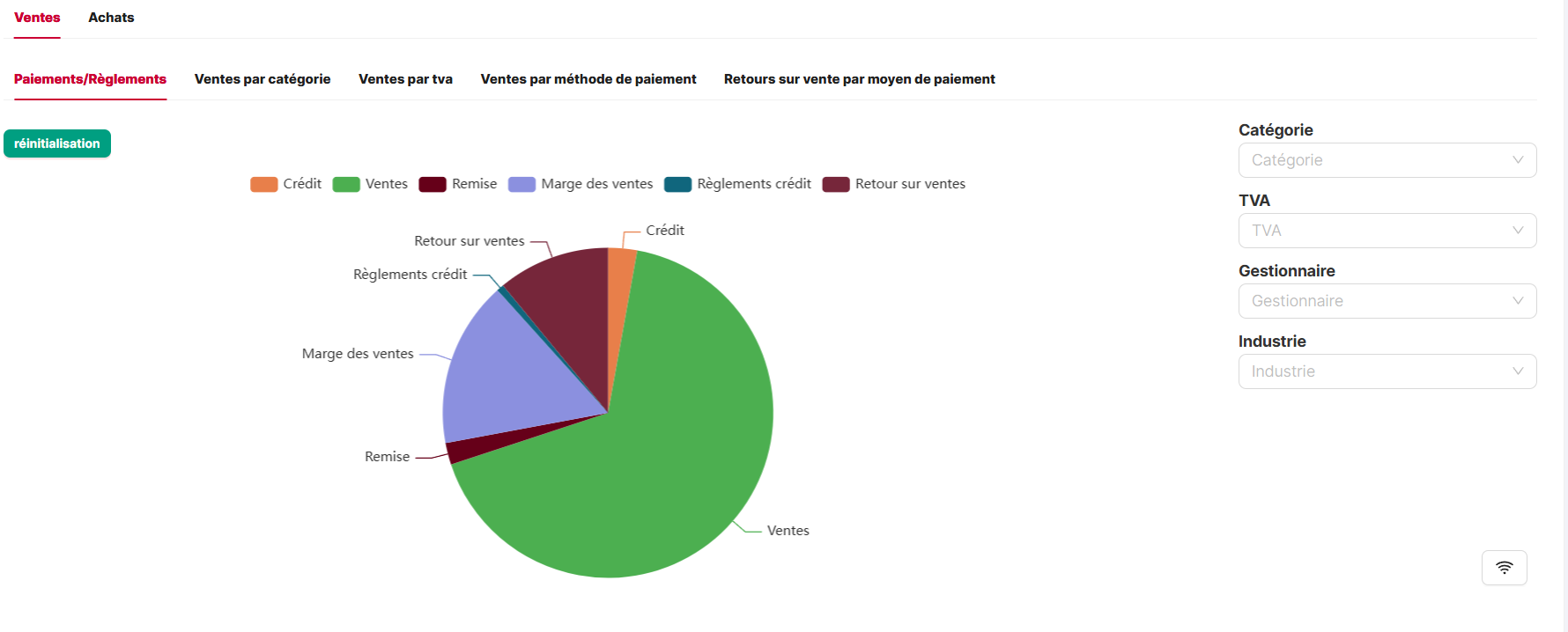
Early view of the stock and sales dashboards built with ECharts, used by pharmacists to monitor daily performance and identify products to reorder.
1. Overview
From scattered spreadsheets to a single PWA
Many small pharmacies still rely on a mix of manual notes, spreadsheets, and basic desktop tools to manage stock, clients, and suppliers. This makes it hard to answer simple, high-impact questions: Which products are about to expire? Which supplier is late? What did we sell the most this week?
This project delivers a Progressive Web Application (PWA) that brings everything into one place, with a responsive UI and dashboards optimised for daily use behind the counter.
Behind the product, this was also my first time working with Docker in a real project. Running the stack locally was a small adventure: multiple containers, a Spring backend, and a Gatsby-based frontend that loved to eat RAM. I had to learn how to keep everything running on a laptop that was not designed for this kind of workload.
I contributed across the stack: React + Ant Design on the frontend, a Spring Boot / GraphQL backend with Spring JPA, and ECharts dashboards for stock and sales visualisation — always with my supervisor pushing me to connect every technical choice back to a concrete action for the pharmacist.
2. Product & Users
Designed for pharmacists, not engineers
The primary users are pharmacists and assistants who need a quick, reliable picture of what is happening in the pharmacy, without navigating technical menus or raw tables.
We focused on a clean, layout with Ant Design, keeping lists, filters, and charts readable even on mid-sized screens. High-value tasks like finding a product, recording a sale, or generating an invoice are reachable in one or two clicks.
On the frontend, my main job was to make the interface feel calm even when the workflow is not. We iterated a lot on layout and micro-interactions: modals instead of full-page reloads, focused pop-ups for critical decisions, and keyboard shortcuts so experienced users could move quickly without touching the mouse.
The PWA behaviour means that the UI stays responsive even on less powerful machines, and the app feels closer to a desktop system while still being easy to deploy and update — which I appreciated personally every time my laptop approached its memory limits.
3. Architecture & Stack
React + GraphQL + Spring JPA
The system follows a classic client–API–database architecture:
- Frontend: React with Ant Design components, a routing layer, and React Query style data fetching patterns.
- API: GraphQL endpoints implemented in Spring Boot, exposing typed queries and mutations for core entities like products, invoices, clients, and suppliers.
- Persistence: Spring JPA repositories backed by a relational database, responsible for transactional integrity and basic business rules.
This project is where I really understood logical separation in a backend: services for business rules, repositories for persistence, model classes to keep the domain clear, and tests that forced me to respect these boundaries. My supervisor was very strict about this, and I am grateful for that now.
The architecture keeps the UI decoupled from the database schema, while GraphQL gives the frontend fine-grained control over which fields it needs — important when rendering dense tables and charts without overloading the client.
Domain model — products, clients, suppliers
Core entities model stock items, client accounts, supplier contracts, and the transactions that connect them.
Architecture decisions
- Use GraphQL to avoid over-fetching in UI-heavy views.
- Rely on Spring JPA for transactional operations and pagination.
- Keep charts powered by aggregate queries instead of client-side calculations.
4. Core Features
From stock to invoices
From a user’s perspective, the app is structured around business entities. For each entity we have a list view and a detail view: pharmacists can scan a table of records, then zoom into one item to act on it.
- Stock management: searchable inventory with quantities, expiry dates, and minimal stock alerts.
- Client & supplier tracking: contact details, transaction history, and outstanding balances.
- Invoice generation: creating printable PDF invoices via React PDF, using consistent layouts and legal fields.
- Dashboards: daily/weekly sales charts, top products, and supplier statistics using ECharts.
Each list view used rich tables with pagination, column filters, and sorting. I was lucky that the low-level logic for filtering and sorting was already implemented — designing and testing how each filter looked and behaved on desktop and mobile was already a big challenge.
On the frontend, I focused on keeping forms fast to fill, with keyboard shortcuts and sensible defaults, while the GraphQL layer handled validating relationships and persisting data in a consistent way.
5. Quality & Testing
Playwright, RTL & Groovy tests
Because this is an operational tool, regressions in stock or invoices are not acceptable. We relied on end-to-end tests to cover the most important flows, and this project is where I started to treat testing as a first-class part of the development lifecycle.
- Creating and editing products and checking stock updates.
- Recording a sale and verifying the generated invoice.
- Updating supplier information and checking that dashboards reflect the changes.
On the backend, Groovy-based tests helped enforce the separation between services, repositories, and models that my supervisor insisted on. On the frontend, I started adding Playwright e2e scenarios and React Testing Library tests for key components, to make sure that complex tables, filters, and modals behaved correctly on both desktop and mobile.
Combined with manual exploratory testing on low-powered devices, this gave us confidence that the PWA behaviour and visualisations stayed smooth as the dataset grew.
6. Impact & Learnings
What this project taught me
The project significantly improved how the pharmacy team could see their business at a glance: instead of juggling multiple tools, they could open a single PWA and get an immediate picture of stock, sales, and pending invoices.
Personally, this was the project where a lot of concepts stopped being “theory” and became muscle memory: PWA development, GraphQL + Spring JPA, clean separation between services and repositories, and the discipline of testing.
More importantly, it reinforced a habit I try to keep in all my work: always tie features back to a concrete workflow and decision that the user needs to make.
And finally, it made me genuinely appreciate Ant Design: without a solid component library, balancing complex tables, responsive layouts, and fast iteration on the UI would have made this project much, much harder.